 Pictius Free image editor in your browser
Free online image editor with layers and AI
Edit photos and designs in your browser with layers, masks and AI that runs on your own device. Nothing to install, and your images are never uploaded.
- Free
- No install, no account
- Images stay on your device
- Layers, masks and AI
What is Pictius?
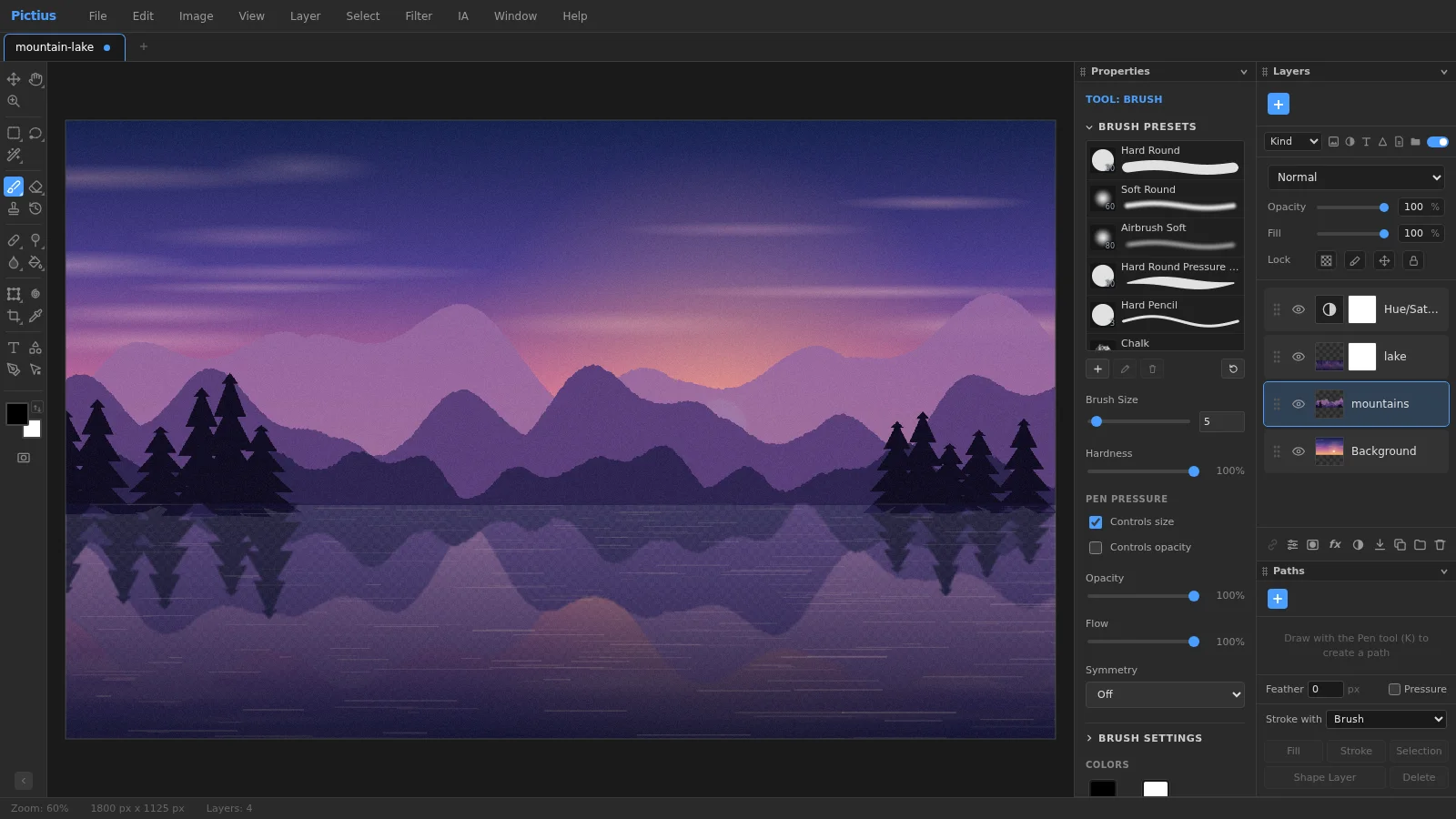
Pictius is a complete image editor that runs in your browser. Open a photo or a PSD file, work with layers and masks, retouch, adjust colors, add text and shapes, and export the result as PNG, JPG, WebP or several other formats. There is no account to create and nothing to install, and your images are processed on your own computer.
It is made for real editing work rather than one-click filters: selections, layer masks, adjustment layers, layer styles, smart objects and a full undo history let you change your mind at any point.
What you can do with Pictius
Everything listed here runs in the browser tab, on your own machine.
- Work in layers: groups, blend modes, opacity, locks, layer masks and clipping masks, plus adjustment, fill, shape and text layers that stay editable.
- Select precisely with the marquee and lasso tools, Magic Wand, Quick Selection, Magnetic Lasso, Color Range and Select Subject, then refine hair and soft edges in Select and Mask.
- Retouch photos with Spot Healing, Healing, Patch, Clone Stamp and Red Eye, along with Dodge, Burn, Sponge, Blur, Sharpen and Smudge.
- Remove unwanted objects with Content-Aware Fill or AI Fill, which rebuild the selected area from its surroundings.
- Correct color and tone with Levels, Curves, Hue/Saturation, Color Balance, Shadows/Highlights and more, as direct edits or as adjustment layers.
- Apply blur, sharpen, noise, distort and stylize filters, also as smart filters that you can edit or switch off later.
- Transform with Free Transform, Warp, Perspective and Liquify, and crop to a ratio, straighten a horizon or fix perspective with Perspective Crop.
- Paint with a brush engine that supports presets, pen pressure, shape dynamics and scattering, and draw with gradients, shapes, the Pen tool and vector paths.
- Add text with editable type layers, the Character and Paragraph panels, and layer styles such as Drop Shadow, Stroke and Bevel & Emboss.
- Automate repetitive work: record Actions and run them on many images with File ▸ Automate ▸ Batch…
- Open and save PSD files, keep projects editable as .pictius files, and export PNG, JPG, WebP, GIF, SVG, PDF or TIFF.
Your images stay on your device
Pictius opens, edits and exports images inside your browser tab. There is no upload step and no server queue: the pixels never leave your computer. That matters for client work, personal photos, scanned documents and anything you would rather not hand to a third party.
The AI tools work the same way. Remove Background, Select Subject, Portrait Mode and AI Fill run their models on your device. A model is downloaded the first time you use its feature, and AI Fill asks before downloading and tells you how large the file is. Your photo is never part of that download; only the model comes to you.
Your work is also saved automatically in the browser while you edit. If the tab closes unexpectedly, Pictius offers to restore your documents the next time you open the editor.
Who it is for
Pictius is built for people who need real editing tools without installing a heavy application.
- Photographers: fix exposure and color, retouch portraits, remove distractions and export for the web.
- Designers: build layouts with layers, shapes, text and layer styles, and exchange PSD files with others.
- Online sellers: cut out products, clean up backgrounds and resize pictures for shops and marketplaces.
- Social media managers: crop and export images at the right size for each network, or process a whole set at once.
- Students and teachers: learn layers, masks and selections in a full editor that needs nothing installed.
- Anyone who needs a quick fix: remove a background, straighten a photo, resize it or convert it to another format.
Good to know
Pictius opens PNG, JPG, WebP, GIF, BMP, AVIF and SVG images, PSD files and its own .pictius projects. Several documents can be open at once, each in its own tab. In Chrome and Edge, Save updates the .pictius project you opened in place; other browsers download a copy.
When you open a PSD file, layers, groups, masks, adjustment layers and most effects come through; anything that cannot be reproduced exactly is listed in a report.
Pictius works best on a computer with a mouse or a pen tablet, and its interface is in English. Keyboard shortcuts can be changed under Edit ▸ Keyboard Shortcuts…, and the panels can be rearranged to suit the way you work.
Frequently asked questions
Is Pictius free?
Yes. You can open, edit and export images without paying and without creating an account.
Are my images uploaded to a server?
No. Images are decoded, edited and exported on your own device. Autosaves and recent files are kept in your browser’s storage and are not sent anywhere.
Which file formats does Pictius support?
It opens PNG, JPG, WebP, GIF, BMP, AVIF, SVG, PSD and .pictius files, and exports PNG, JPG, WebP, GIF, SVG, PDF, TIFF and PSD. The .pictius format keeps every layer, mask, style and text layer editable.
How do the AI tools work without uploading my photo?
Everything runs in your browser. Features that use a model, such as Select ▸ Subject or AI Fill, download it the first time you use them; others, such as Super Resolution 2x, need no download. Either way, the image is processed on your device and never sent to a server.
Can I install Pictius as an app?
Yes, in Chrome and Edge. Use File ▸ Install Pictius… or the install button in the address bar. The installed app opens in its own window and can open images and projects straight from your file manager.
Image editing guides
- Remove the background from an imageRemove the background from a photo in your browser: select the subject with AI, refine the edges with a layer mask and export a transparent PNG. No uploads.
- Remove objects from a photoErase unwanted objects, people or text from a photo: select them and use Content-Aware Fill, AI Fill, Spot Healing or Patch. Everything runs in your browser.
- Cut out hair and objects preciselyCut out people, hair, pets and products: start with Quick Selection or Select Subject, refine the edge in Select and Mask and output a layer mask or a new layer.
- Blur the background of a photoBlur the background of a photo to make the subject stand out: use Portrait Mode, or select the subject and apply Gaussian Blur to the rest. Free, in your browser.
- Resize an imageResize an image to exact pixels or a percentage with Image Size, choose the resampling method, and add or trim space around it with Resize Canvas. Free and private.
- Crop and straighten a photoCrop a photo to a ratio such as 1:1, 4:5 or 16:9, straighten a tilted horizon, fix perspective with Perspective Crop and trim empty borders. Free, in your browser.
- Upscale an imageEnlarge a small image with Super Resolution 2x, which doubles its size with smooth interpolation and sharpening, or pick an exact size and method in Image Size.
- Convert an image to another formatConvert images in your browser: open PNG, JPG, WebP, AVIF, GIF or PSD files and export PNG, JPG, WebP, GIF, SVG, PDF or TIFF with the quality and scale you choose.